
SOML Editor
View and edit SOML files

Free · Requires macOS 27 or later · No data collected
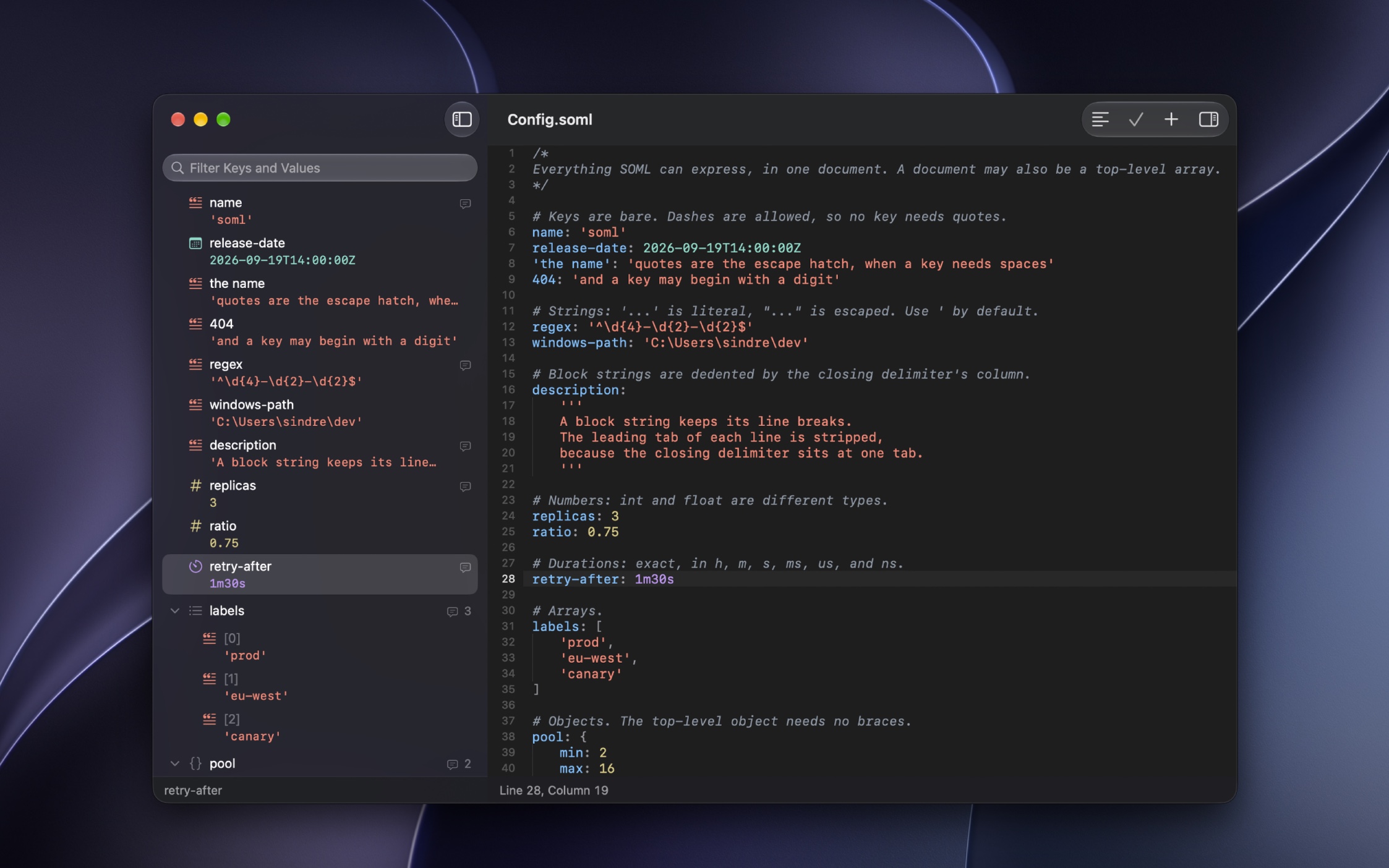
SOML is a new config format for humans, and an alternative to JSON.
Browse your document as a tree alongside its source. Find keys and values, inspect their types, and edit individual settings while preserving surrounding comments and formatting.
Features
- Syntax highlighting and clear error messages
- Searchable outline and quick navigation by key path
- Edit values, rename keys, and reorder items, while keeping comments
- Format documents and switch between single-line and multiline layouts
- Convert between SOML and JSON
- Preview files with Quick Look
- Automate formatting, validation, and conversion with Shortcuts
iOS version is planned
Tips
Use the outline from the keyboard
Press Command1 to focus the outline and Command2 to return to the source. Return edits the selected value, switches a bool, or expands a container. Option-click a disclosure arrow to expand or collapse everything inside it.
Frequently Asked Questions
I have a feature request, bug report, or some feedback
Click the feedback button in the app or send it here.
What is SOML?
SOML is a configuration format designed to be pleasant to write and easy to read. It supports comments, unquoted keys, multiline strings, dates, and durations. Top-level objects need no braces, and line breaks can replace commas. A value’s type comes from its syntax, so '123' is always a string and 123 is a number.
Why use this instead of a regular text editor?
The outline lets you browse nested values without following brackets by hand. You can inspect types, jump to a key path, and edit or move individual items while keeping surrounding comments. You can still edit the source directly whenever you prefer. The main usefulness, however, is to get Quick Look previews of SOML files.
Why does it require macOS 27 or later?
The app uses newer system APIs for document handling and text editing. Supporting older versions would mean extra testing, compatibility code, and working around older system bugs. Keeping the requirements current lets me focus on improving the app.
Can I use the app offline? Are my files uploaded anywhere?
Editing, validation, formatting, and conversion all run locally on your Mac. The app does not upload your documents. If you save a file in iCloud Drive or another synced folder, that service handles syncing it.
Can I edit JSON, TOML, or YAML files?
The app edits SOML files. You can export a document as JSON, and use the “Convert JSON to SOML” Shortcuts action to get SOML from JSON. TOML, YAML, and property lists are not supported.
Does converting to JSON preserve everything?
No. JSON has no comments, dates, or durations. Comments and source formatting are lost, and dates and durations become strings. Converting those strings back to SOML leaves them as strings. Values such as infinity cannot be exported as JSON.
Does editing preserve comments and formatting?
Editing an individual value preserves the surrounding source. Renaming keys and moving items also preserve their source spelling and attached comments.
“Edit › Format Document” expands nonempty objects and arrays onto separate lines and removes redundant commas. It keeps comments and value spelling.
Can I open my files in other editors?
Yes. SOML files are ordinary UTF-8 text files. There is no app-specific wrapper or database. You can edit them in another text editor and track changes with Git.
Can I preview a file without opening it?
Yes. Select a .soml file in Finder and press Space to see its Quick Look preview.
How can I sync files between devices?
Save your files in iCloud Drive or another file provider available on your devices. SOML documents are ordinary text files, so you can also share them or keep them in version control.
Can I automate the app with Shortcuts?
Yes. It provides actions to format and validate SOML, convert between SOML and JSON, and get the value at a key path. The actions accept text or a file and run without opening the editor.
How can I jump to a deeply nested value?
Choose “View › Go to Path…” or press ShiftCommandO, then search for a path such as server.host or items[0]. You can also filter keys and values in the outline.
How can I copy a string without its quotes?
Right-click the item in the outline and choose “Copy String Contents”. This copies the string’s value, including decoded escape sequences. “Copy Value” copies its SOML source instead, including quotes. “Copy String Contents” only appears for strings.
How can I make the source easier to read?
Use “View › Bigger Text” to increase the text size. The View menu also lets you toggle line wrapping and show invisible characters. Settings has options for indentation guides and highlighting the current line.
Why can’t I edit values in the outline?
Fix any syntax errors in the source first. While the document is invalid, the outline shows the last valid structure and disables edits. The error message helps you find what needs fixing.
Why is this free without ads?
I just enjoy making apps. Consider leaving a nice review on the App Store.
How can I turn off automatic filename suggestions when saving?
On macOS:
- Open Finder.
- Click Finder in the menu bar, then Settings.
- Go to the General tab.
- Uncheck “Suggest file names”.
Get SOML Editor
View and edit SOML files
Free
Information
- Platform
- macOS
- Requires
- macOS 27 or later
- Category
- Developer Tools
- Released
- October 2026
- Privacy
- No data collected
- Developer
- Sindre Sorhus